Hey everyone, thanks for popping in. As a transceiver supplier, I get tons of DMs every week asking the same thing: “How do I actually install these things without messing up my network?” It’s not rocket science, but if you skip a few small steps, you can end up with dropped connections, weird speed issues, or even damaging your transceiver or switch. I’ve seen way too many people pull a transceiver out wrong, or plug it in at the wrong angle, and that’s the kind of avoidable headache I want to help you skip. Optical Transceivers
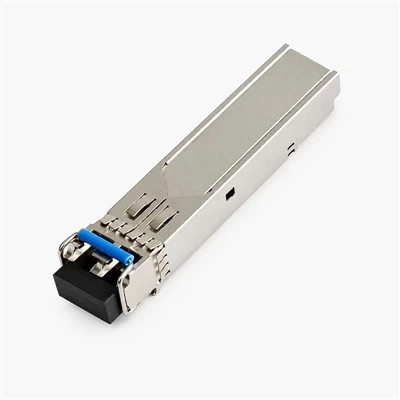
First off, let’s set a quick baseline: optical transceivers (the SFP, QSFP, QSFP28, whatever you’re using) are small, hot-pluggable modules that plug into your switch, router, or server’s port. They act like a translator—your network’s electrical data gets converted to light, which travels over fiber optic cables, then back to electrical on the other end. Most of the mistakes people make happen either before plugging it in, during installation, or right after turning everything on. Let’s break this down step by step, no jargon overload, just what actually works.
First, pre-install checks—this is the part most people gloss over, and it’s where half the issues start. I can’t tell you how many times a customer has reached out saying their transceiver isn’t working, and the problem is just that they grabbed a QSFP28 for a 10G switch port, not a 10G SFP+. Let’s keep it simple here: check the port speed and type on your device first. If it’s a 100G port, you need a 100G-compatible transceiver; 25G = 25G, 10G = 10G. Also, check the fiber type. Single-mode (SMF) fiber is for long runs—think over 100 meters, like across a campus or building. Multi-mode (MMF) is for shorter distances, under 100 meters, like in a server rack. If you try to use an SMF transceiver with MMF fiber, you’ll get super weak signal or no connection at all. I always tell new customers: cross-reference the transceiver’s specs (it’ll say “compatible with SMF” or “MMF” on the label) with your cable’s label. That’s the quick win.
Also, before touching the transceiver or fiber, wash your hands. No, seriously—oil, dirt, or sweat on your fingers can get on the transceiver’s connectors or the fiber ends, and that’s a surefire way to cause signal loss. I keep a bottle of isopropyl alcohol wipes and a lint-free microfiber cloth in my toolbox for every installation, even the tiny ones. Cheap wipes leave lint, so avoid those. If you do get a bit of dust on a fiber end, a gentle wipe with that alcohol cloth is way better than just blowing on it (your mouth has moisture, which is worse) or using a random paper towel. Paper towels have tiny fibers that get stuck, trust me.
Now, actual installation. Let’s start with the transceiver itself. Most transceivers have a small plastic tab on the side—this is the release latch. Don’t yank the transceiver out without pressing that first. To install it, just align the gold connector on the bottom of the transceiver with the slot on your switch port. It should slide in smoothly, no force needed. If it won’t go in easy, stop—you’re probably misaligned, or there’s dirt in the port. Force it, and you can bend the transceiver pins or break the latch, and that’s a $100+ mistake. Once it’s seated all the way, you’ll hear a tiny click—that means it’s locked in. Don’t try to wiggle it after it clicks; that can loosen it.
Next, connecting the fiber. This part is where people mess up the most. Fiber cables have two ends: Tx (transmit) and Rx (receive) on the transceiver. Super important: never cross them. Tx on the transceiver goes to Rx on the cable, and Rx on the transceiver goes to Tx on the other end. If you plug Tx to Tx, you get a loop, and no data will transfer. I’ve seen this so many times, it’s become a running joke with my team. If you’re working with a MTP/MPO cable for high-density ports, it’s even easier to mix up, but most have color-coded tips—blue for Tx, red for Rx, or vice versa, so double-check that. Also, when you insert the fiber into the transceiver, don’t push too hard, but make sure it’s all the way in until you hear another click. Some transceivers have a boot that snaps over the connector to keep it secure, so don’t skip that step either.
Wait, a quick note on hot-plugging. Most transceivers are hot-swappable, meaning you can plug them in or pull them out without turning off your device. But—don’t make a habit of it. If you’re doing a big installation, power off the switch if you can, or at least let it stabilize for 10 seconds between plugging transceivers. Constantly yanking and replugging can stress the port over time, leading to failure down the line. It’s not dangerous, but it’s not good for longevity.
Now, post-install steps. You didn’t just plug them in and walk away, right? First, check the lights on the transceiver. Most transceivers have two LEDs: one for power, one for link status. The power light should be solid green as soon as it’s seated. The link light will flicker at first as the connection negotiates, then turn solid green if the fiber is connected correctly. If the link light is off or red, that’s a red flag. Here’s what to check in that order: did you plug the Tx and Rx right? Is the fiber end clean? Is the transceiver compatible with your switch? I’ve had customers swap out their entire network because they plugged Tx to Rx backwards, so don’t skip that simple check.
Next, a quick speed test. Once the link is solid, run a speed test between the two ends. For example, if you installed a 10G transceiver, test that you’re getting at least 9Gbps (real-world speeds are never exactly the rated number, but if it’s dropping to 1G, something’s wrong). Also, check for dropped packets—most network tools let you run a quick ping test or use iperf3 to check that. If you’re getting tons of dropped packets, that’s probably a dirty fiber end, or a loose connection. I always tell customers to test each link individually when installing multiple transceivers, so if one is bad, you don’t have to recheck the whole rack later.
Wait, what about compatibility? A lot of people ask: “Can I use a third-party transceiver with my Cisco, Juniper, HP switch?” The short answer is usually yes, but make sure your transceiver is “forward-compatible” or on the switch’s compatibility list. Some brands have locked ports, but most modern switches work with any SFP-compatible transceiver. As a supplier, we test all our transceivers with popular switch brands, so you can ask us for the latest compatibility list if you’re not sure. Don’t just buy a random transceiver off Amazon that says “universal”—those cheap ones often have bad components, so they’ll fail after a few weeks.
Also, cable length matters. If your run is longer than the transceiver’s rated maximum, you’ll get no link. For example, a 10G SFP+ MMF transceiver usually maxes out at 300 meters, while SMF can go up to 10km, 40km, even 100km. If your run is 500 meters, a 300m transceiver won’t work, even if the connector is right. That’s another common mistake—people don’t check the distance spec.
Let’s talk about common mistakes I see all the time, just so you know what to avoid. First, bending fiber cables too tight. Fiber is fragile—if you bend it to a radius smaller than the manufacturer recommends (usually around 10mm for MMF, 15mm for SMF), you can crack the core, and that kills the signal. Don’t route fiber tight around rack corners, and don’t step on them, even if they feel thick. Second, leaving the transceiver’s dust cap off when not in use. Those tiny plastic caps keep dust out of the connector when the transceiver is out, so if you pull a transceiver to test something, always put the cap back on until you’re ready to plug it back in. Dust is the number one cause of short-term transceiver failure, way more than any manufacturing defect. Third, using the wrong tools. You don’t need a super expensive fiber tool kit for a small installation, but a simple crimper and stripper for fiber ends is worth it. Trying to cut or strip fiber with regular pliers will just break the core, I promise.
Now, let’s cover a quick troubleshooting guide if things go wrong, because even with all the steps, sometimes it doesn’t work. Step 1: Check the LEDs again. If power light is red, the transceiver isn’t seated right—pull it out, check for dirt in the port, and reinsert. If power is green, link is red: check Tx/Rx, clean fiber ends, make sure the transceiver is compatible. Step 2: Swap the fiber ends. If it works when you plug Tx to Tx, that means you had them backwards, no big deal. Step 3: Test the transceiver in another port, or swap it for a known good one. If the new transceiver works in another port, the original port on the switch might be bad. Step 4: Check the fiber cable for damage—look for kinks, cuts, or frayed ends. If there’s a fray, you’ll need to re-terminate it, or get a new cable.
I know installing transceivers can feel overwhelming, especially if you’re working with a big network, but it’s way simpler than it sounds. The key is taking the time to do the pre-checks, keep everything clean, and not force anything. Most issues are avoidable with those small steps. And for what it’s worth, if you’re shopping for transceivers, we test every unit before shipping, so you don’t have to worry about duds. If you’re planning a big installation, or just have a question about compatibility, speed, or anything else, feel free to reach out to our team to chat. We’re happy to help you pick the right transceivers for your setup, no jargon, no sales pitch.

At the end of the day, a good installation starts with the right product and the right steps. Don’t cut corners on cleaning, don’t mix up Tx and Rx, and don’t skip the speed test. Your network will run smoother, and you’ll save yourself a ton of time troubleshooting later. Thanks for reading—hope this helps you the next time you’re installing transceivers. If you need to order or have questions about your specific setup, just get in touch with our sales team to discuss your procurement needs.
Infrared LED Emitters References:
- Fiber Optic Association. "Best Practices for Transceiver Installation and Maintenance." FOA Guide to Fiber Optic Technology, 2023.
- Cisco Systems. "SFP and SFP+ Transceiver Compatibility Guidelines." Cisco Support Community, 2022.
- Juniper Networks. "Hot-Swapping Transceivers: Do’s and Don’ts for Network Reliability." Juniper Tech Library, 2023.
- TIA-568-C.3. "Standard for Optical Fiber Cabling Components." Telecommunications Industry Association, 2021.
Zhejiang Chengmei Technology Co., Ltd.
As one of the most professional optical transceivers manufacturers and suppliers in China, we’re featured by quality products and good price. Please rest assured to wholesale bulk premium optical transceivers made in China here from our factory. Also, quotation is available.
Address: No. 383, Jinhe Road, Qinshan Street Industrial Park, Haiyan County, Jiaxing City, Zhejiang Province
E-mail: shiwei@cm-semi.com
WebSite: https://www.cmfiber.com/
